We have a number of additional voices that you can download and install for Read&Write for Windows. To do this please visit your account my.texthelp.com and choose My Voices on the left panel.
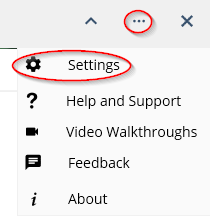
1. Click on the Settings button, and then Settings.
2. In Read&Write settings, go to Speech and select the voice you installed from the Voice drop down list.
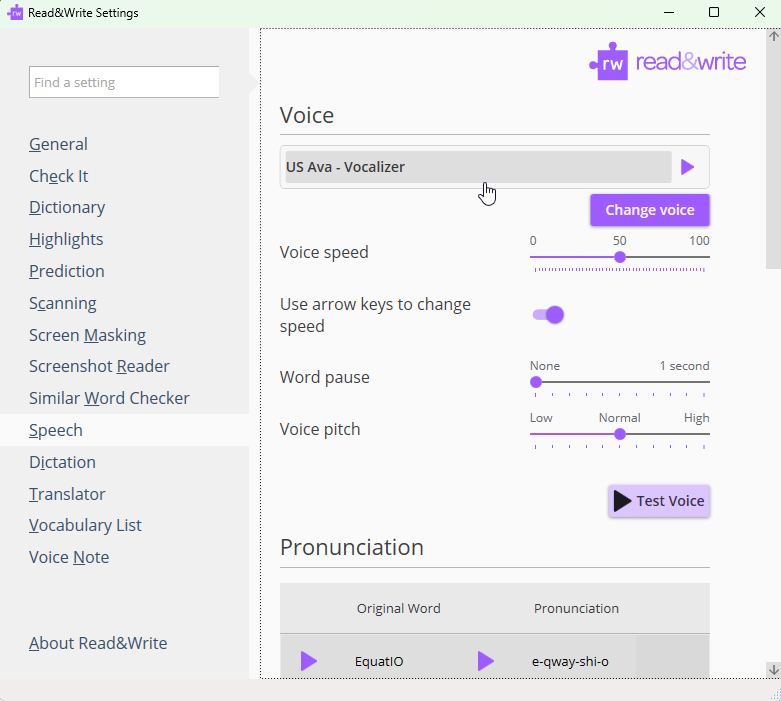
Read&Write will now use the new voice you installed.
List of Available Windows Voices
Arabic Male Tarik
Australian Male Lee
Australian Female Karen
Brazilian Portuguese Female Lucina
Chinese (Mandarin) Female Tian-tian
Dutch Female Claire
French Canadian Female Chantal
French Canadian Male Nicholas
French Female Audrey
French Male Thomas
German Female Anna
German Male Yannick
Hindi Female Lekha
Italian Female Alice
Irish Female Moira
Indian English Female Veena
Norwegian Female Nora
Polish Female Ewa
Portuguese Female Catarina
Russian Female Melina
Scottish Female Fiona
South African Female Tessa
Spanish Female Monica
Swedish Female Alva
UK Female Serena
US Female Allison