Getting your mind map into the hands of your team or collaborators is fast and easy.
Here are the three powerful ways to share and impress:
1. Share Securely with a Direct Link
This is the smooth, secure path to collaborate! It saves your mind map to your secure MindView Drive and sends a direct, private access link.
Click the File tab in the top left.
Select Share from the menu on the left.
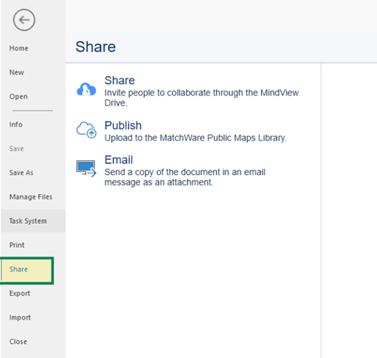
In the Share field, just type the names (if they use MindView) or the email addresses of the people you want to share with.
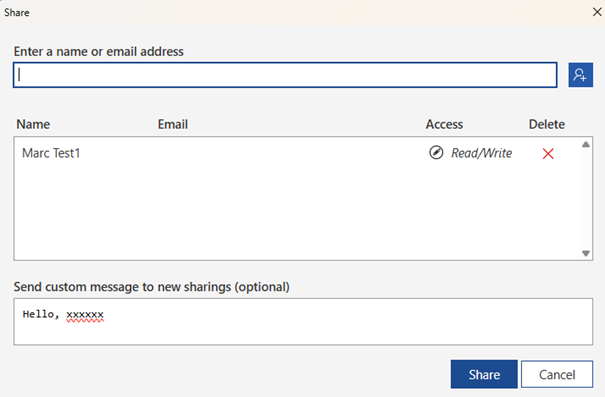
Hit Share to send the invitations!
The Boost: Users get an email with a private link. This is the key to saving you time and ensuring only your intended collaborators can access the file. Even if they don't have an account yet, the email will give them everything they need to get started!
2. Publish to the Public Library
Want the world to see your creation? The Publish option is perfect for sharing widely!
Click the Publish option in the sharing menu.
This instantly uploads your mind map to MindView’s public online library and generates a public link you can share anywhere on social media, in a presentation, or via chat.
Important Note: This library is open to everyone! All visitors can see, download, and use your published documents. Think of it as a showcase for your incredible ideas!
3. Quick Share via Email
For a fast, traditional approach, just email the file directly.
Select the Email option.
This will automatically open your computer's email program and attach the mind map file to a new message.
Fill in your recipients and hit send!